plot
R2026bDescription
plot( plots the RoadRunner HD Map's lane centers, lane boundaries, lane group centers, and
barriers.rrMap)
plot(
specifies additional name-value pair arguments for the HD map.rrMap,Name=Value)
returns a
figure handle as an axesHandle = plot(___)axes object.
Examples
Create an empty RoadRunner HD Map by calling the roadrunnerHDMap object.
rrMap = roadrunnerHDMap;
Specify the name of the binary file you want to read. Use the read function to read the file specified by the argument filename.
filename = "C:\RR\MyProject\Scenes\MyMap.rrhd";
read(rrMap,filename)
rrMaprrMap =
roadrunnerHDMap with properties:
Author: ""
GeoReference: [0 0]
GeographicBoundary: [2×3 double]
Lanes: [728×1 roadrunner.hdmap.Lane]
SpeedLimits: [356×1 roadrunner.hdmap.SpeedLimit]
LaneBoundaries: [908×1 roadrunner.hdmap.LaneBoundary]
LaneGroups: [163×1 roadrunner.hdmap.LaneGroup]
LaneMarkings: [4×1 roadrunner.hdmap.LaneMarking]
Junctions: [11×1 roadrunner.hdmap.Junction]
BarrierTypes: [0×1 roadrunner.hdmap.BarrierType]
Barriers: [0×1 roadrunner.hdmap.Barrier]
SignTypes: [2×1 roadrunner.hdmap.SignType]
Signs: [4×1 roadrunner.hdmap.Sign]
StaticObjectTypes: [5×1 roadrunner.hdmap.StaticObjectType]
StaticObjects: [443×1 roadrunner.hdmap.StaticObject]
StencilMarkingTypes: [2×1 roadrunner.hdmap.StencilMarkingType]
StencilMarkings: [10×1 roadrunner.hdmap.StencilMarking]
CurveMarkingTypes: [1×1 roadrunner.hdmap.CurveMarkingType]
CurveMarkings: [10×1 roadrunner.hdmap.CurveMarking]
SignalTypes: [2×1 roadrunner.hdmap.SignalType]
Signals: [10×1 roadrunner.hdmap.Signal]
ParkingEdges: [0×1 roadrunner.hdmap.ParkingEdge]
ParkingSpaces: [0×1 roadrunner.hdmap.ParkingSpace]
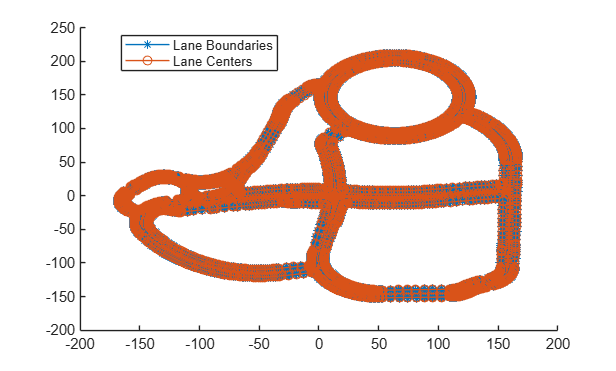
Plot the map.
plot(rrMap)
Input Arguments
RoadRunner HD Map road data model, specified as a roadrunnerHDMap object. rrMap
defines a simple data structure to represent road layouts using lanes, lane boundaries,
lane markings, and junctions. This object provides functions that support reading,
writing, and plotting HD map data.
Name-Value Arguments
Specify optional pairs of arguments as
Name1=Value1,...,NameN=ValueN, where Name is
the argument name and Value is the corresponding value.
Name-value arguments must appear after other arguments, but the order of the
pairs does not matter.
Example:
Handle to an axes object, specified as a handle object to
contain the plot. If this property is not specified, the plot
function generates a new figure.
Display lane group centers in the plot, specified as logical 0
(false) or logical 1 (true). If you set
ShowLaneGroups to true, then the
plot function displays the lane group centers in the plot.
Display barrier centers in the plot, specified as logical 0
(false) or logical 1 (true). If you set
ShowBarriers to true, then the
plot function displays the barrier centers in the plot.
Display signs in the plot, specified as logical 0 (false) or
logical 1 (true). If you set ShowSigns to
true, then the plot function displays the
signs in the plot.
Display static objects in the plot, specified as logical 0
(false) or logical 1 (true). If you set
ShowStaticObjects to true, then the
plot function displays the static objects in the plot.
Display legend in the plot, specified as logical 1 (true) or
logical 0 (false). If you set ShowLegend to
false, then the plot function does not
displays the legend for the plot. A legend is not shown when the
Parent name-value argument is specified.
Display line markers in the plot, specified as logical 1 (true)
or logical 0 (false). If you set ShowLineMarkers
to true, then the plot function displays the
line markers for the plot.
Output Arguments
Figure handle, returned as an Axes object.
Version History
Introduced in R2022b
MATLAB Command
You clicked a link that corresponds to this MATLAB command:
Run the command by entering it in the MATLAB Command Window. Web browsers do not support MATLAB commands.
Seleccione un país/idioma
Seleccione un país/idioma para obtener contenido traducido, si está disponible, y ver eventos y ofertas de productos y servicios locales. Según su ubicación geográfica, recomendamos que seleccione: .
También puede seleccionar uno de estos países/idiomas:
Cómo obtener el mejor rendimiento
Seleccione China (en idioma chino o inglés) para obtener el mejor rendimiento. Los sitios web de otros países no están optimizados para ser accedidos desde su ubicación geográfica.
América
- América Latina (Español)
- Canada (English)
- United States (English)
Europa
- Belgium (English)
- Denmark (English)
- Deutschland (Deutsch)
- España (Español)
- Finland (English)
- France (Français)
- Ireland (English)
- Italia (Italiano)
- Luxembourg (English)
- Netherlands (English)
- Norway (English)
- Österreich (Deutsch)
- Portugal (English)
- Sweden (English)
- Switzerland
- United Kingdom (English)