featureEdges
Sharp edges of surface triangulation
Description
F = featureEdges(
returns the feature
edges in a 2-D triangulation according to an angle
TR,theta)theta. This function is typically used to extract sharp edges
in a surface mesh plot.
Examples
Find and plot the feature edges of a surface.
Create a 2-D Delaunay triangulation.
x = [0 0 0 0 0 3 3 3 3 3 3 6 6 6 6 6 9 9 9 9 9 9]'; y = [0 2 4 6 8 0 1 3 5 7 8 0 2 4 6 8 0 1 3 5 7 8]'; DT = delaunayTriangulation(x,y); T = DT.ConnectivityList;
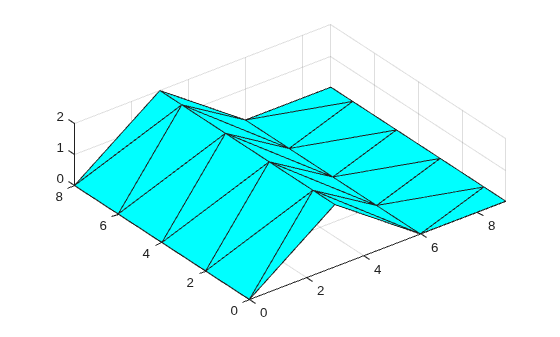
Add elevations to the triangulation to create a surface and plot the surface.
z = [0 0 0 0 0 2 2 2 2 2 2 0 0 0 0 0 0 0 0 0 0 0]'; trisurf(T,x,y,z,FaceColor="cyan") axis equal
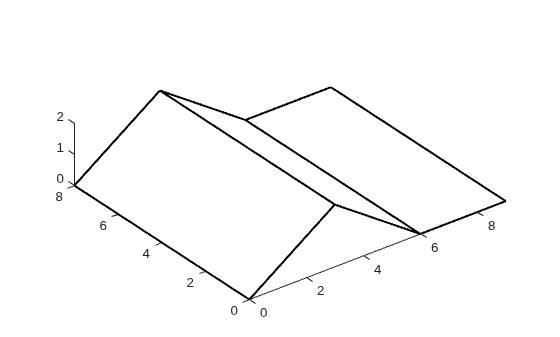
Create a new triangulation on the elevated surface, and compute and plot its feature edges using a filter angle of .
TR = triangulation(T,x,y,z); F = featureEdges(TR,pi/6)'; plot3(x(F),y(F),z(F),"k",LineWidth=1.5); axis equal
Input Arguments
Triangulation representation for 2-D triangulations only, specified as a
scalar triangulation or delaunayTriangulation
object.
Data Types: triangulation | delaunayTriangulation
Filter angle in radians, specified as a scalar in the range [0,π].
featureEdges returns adjacent triangles that have a
dihedral angle that deviates from π by an angle greater than
theta.
Data Types: double
More About
A feature edge is a triangulation edge that has any of the following attributes:
The edge belongs to only one triangle.
The edge is shared by more than two triangles.
The edge is shared by a pair of triangles with angular deviation greater than the angle
theta.
F is a two-column matrix whose rows correspond to a feature
edge. The first element of each row is the identification number of the starting
edge vertex, and the second element is the identification number of the ending edge
vertex. A vertex identification is the row number of the corresponding vertex in the
Points property.
Extended Capabilities
Thread-Based Environment
Run code in the background using MATLAB® backgroundPool or accelerate code with Parallel Computing Toolbox™ ThreadPool.
Version History
Introduced in R2013aThis syntax using TriRep and DelaunayTri
objects as triangulation representations TR is not
recommended:
F = featureEdges(TR,theta)returns an edge matrixF. This method is typically used to extract the sharp edges in the surface mesh for the purpose of display. Edges that are shared by only one triangle and edges that are shared by more than two triangles are considered to be feature edges by default. For 2-D triangulations in MATLAB®, the triangles are arranged in counter-clockwise order around the attached vertex.Note
This query is only applicable to triangular surface meshes.
Use triangulation and delaunayTriangulation instead.
See Also
MATLAB Command
You clicked a link that corresponds to this MATLAB command:
Run the command by entering it in the MATLAB Command Window. Web browsers do not support MATLAB commands.
Seleccione un país/idioma
Seleccione un país/idioma para obtener contenido traducido, si está disponible, y ver eventos y ofertas de productos y servicios locales. Según su ubicación geográfica, recomendamos que seleccione: .
También puede seleccionar uno de estos países/idiomas:
Cómo obtener el mejor rendimiento
Seleccione China (en idioma chino o inglés) para obtener el mejor rendimiento. Los sitios web de otros países no están optimizados para ser accedidos desde su ubicación geográfica.
América
- América Latina (Español)
- Canada (English)
- United States (English)
Europa
- Belgium (English)
- Denmark (English)
- Deutschland (Deutsch)
- España (Español)
- Finland (English)
- France (Français)
- Ireland (English)
- Italia (Italiano)
- Luxembourg (English)
- Netherlands (English)
- Norway (English)
- Österreich (Deutsch)
- Portugal (English)
- Sweden (English)
- Switzerland
- United Kingdom (English)