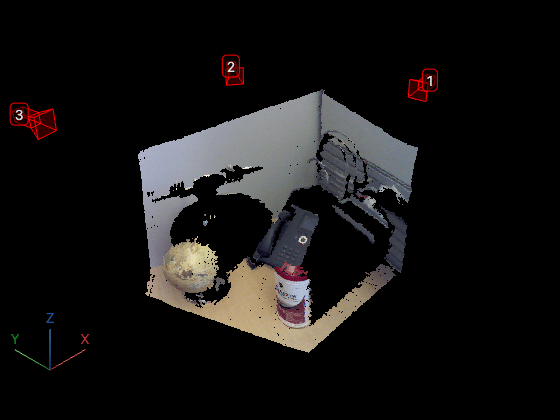
A Camera object represents a camera in a pcviewer scene.
The addCamera
object function returns a Camera object when you add one or more cameras to
a pcviewer
object. You can use the properties of the Camera object to control the
appearance and behavior of the cameras in the scene.
Camera pose, specified as a rigidtform3d (Image Processing Toolbox)
object.
Camera size, specified as a positive scalar.
Camera label, specified as a string scalar.
Camera color, specified as an RGB triplet.
Transformation applied to the point cloud in the scene, specified as a rigidtform3d (Image Processing Toolbox),
affinetform3d (Image Processing Toolbox), simtform3d (Image Processing Toolbox),
or transltform3d (Image Processing Toolbox).
Transparency of camera faces, specified as a numeric scalar in the range
[0,1]. For cameras displayed using the
"frustrum" style, this property controls the transparency of the
far plane.
Display point cloud in scene, specified as "on" or
"off", or as a numeric or logical 0
(false) or 1 (true). A value
of "on" is equivalent to true and shows the points
magnified. A value of "off" is equivalent to false
and shows points unmagnified, as they would appear from the position of the
camera.
Camera axis visibility, specified as "on" or
"off", or as a numeric or
logical 1 (true) or 0
(false). The visibility value applies to all cameras. A
value of "on" is equivalent to true, and
"off" is equivalent to false. Thus, you can use
the value of the property set by this argument as a logical value. The value is stored
as an on/off logical value of type OnOffSwitchState.
Camera principal axes visibility, specified as "on" or
"off", or as a numeric or
logical 1 (true) or 0
(false). The visibility value applies to all cameras. A
value of "on" is equivalent to true, and
"off" is equivalent to false. Thus, you can use
the value of the property set by this argument as a logical value. The value is stored
as an on/off logical value of type OnOffSwitchState.
You clicked a link that corresponds to this MATLAB command:
Run the command by entering it in the MATLAB Command Window.
Web browsers do not support MATLAB commands.
Seleccione un país/idioma
Seleccione un país/idioma para obtener contenido traducido, si está disponible, y ver eventos y ofertas de productos y servicios locales. Según su ubicación geográfica, recomendamos que seleccione: .
También puede seleccionar uno de estos países/idiomas:
Cómo obtener el mejor rendimiento
Seleccione China (en idioma chino o inglés) para obtener el mejor rendimiento. Los sitios web de otros países no están optimizados para ser accedidos desde su ubicación geográfica.