Contenido principal

boxLabelDatastore

R2026b

Datastore for bounding box label data

Description

The boxLabelDatastore object creates a datastore for bounding box label data. Use this object to read labeled bounding box data for object detection.

To read bounding box label data from a boxLabelDatastore object, use the read function. You can create a datastore that combines the boxLabelDatastore object with a point cloud datastore using the combine object function. Use the combined datastore to train 3-D object detectors using training functions such as trainPointPillarsObjectDetector. For more information, see pointCloudObjectDetectorTrainingData. To modify the ReadSize property, you can use dot notation.

Creation

Description

blds = boxLabelDatastore(tbl1,...,tbln) creates a boxLabelDatastore object from one or more tables containing labeled bounding box data.

blds = boxLabelDatastore(tbl1,...,tbln,bSet) creates a boxLabelDatastore object for block-based labeled bounding box data. The blocks have resolution level, block size, and block positions specified by the block locations in bSet.

Input Arguments

expand all

Labeled bounding box data, specified as a table with one or more columns. Each table corresponds to a set of labels. The bounding boxes can be axis-aligned rectangles, rotated rectangles, or cuboids. The table below describes the format of the bounding boxes.

Bounding BoxDescription
Axis-aligned rectangle

Defined in spatial coordinates as an M-by-4 numeric matrix with rows of the form [x y w h], where:

  • M is the number of axis-aligned rectangles.

  • x and y specify the upper-left corner of the rectangle.

  • w specifies the width of the rectangle, which is its length along the x-axis.

  • h specifies the height of the rectangle, which is its length along the y-axis.

Rotated rectangle

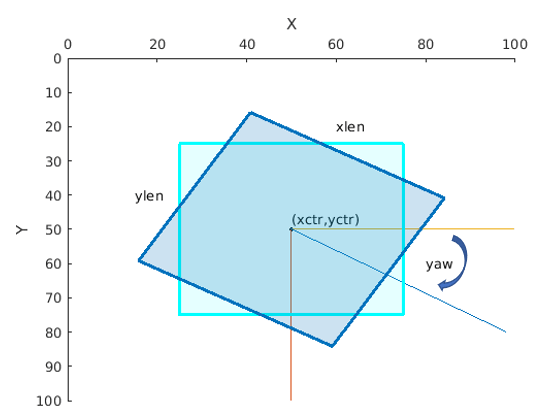
Defined in spatial coordinates as an M-by-5 numeric matrix with rows of the form [xctr yctr xlen ylen yaw], where:

  • M is the number of rotated rectangles.

  • xctr and yctr specify the center of the rectangle.

  • xlen specifies the width of the rectangle, which is its length along the x-axis before rotation.

  • ylen specifies the height of the rectangle, which is its length along the y-axis before rotation.

  • yaw specifies the rotation angle in degrees. The rotation is clockwise-positive around the center of the bounding box.

Square rectangle rotated by -30 degrees.

Cuboid

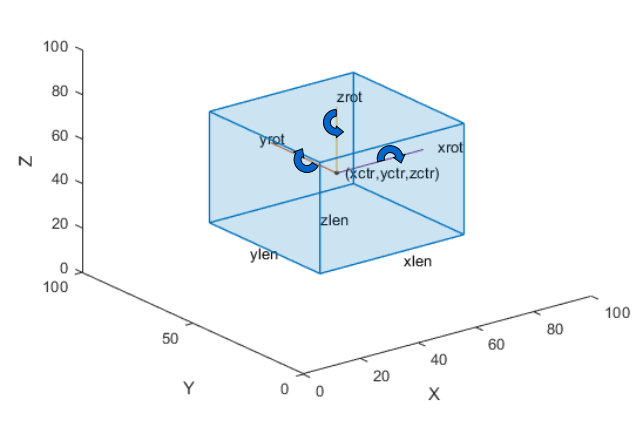
Defined in spatial coordinates as an M-by-9 numeric matrix with rows of the form [xctr yctr zctr xlen ylen zlen xrot yrot zrot], where:

  • M is the number of cuboids.

  • xctr, yctr, and zctr specify the center of the cuboid.

  • xlen, ylen, and zlen specify the length of the cuboid along the x-axis, y-axis, and z-axis, respectively, before rotation.

  • xrot, yrot, and zrot specify the rotation angles of the cuboid around the x-axis, y-axis, and z-axis, respectively. The xrot, yrot, and zrot rotation angles are in degrees about the cuboid center. Each rotation is clockwise-positive with respect to the positive direction of the associated spatial axis. The function computes rotation matrices assuming ZYX order Euler angles [xrot yrot zrot].

The figure shows how these values determine the position of a cuboid.

Projected Cuboid

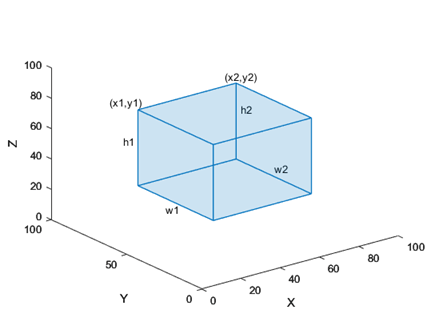
M-by-8 vector of the form [x1, y1, w1, h1, x2, y2, w2, h2], where:

  • M is the number of labels in the frame.

  • x1, y1 specifies the x,y coordinates for the upper-left location of the front-face of the projected cuboid

  • w1 specifies the width for the front-face of the projected cuboid.

  • h1 specifies the height for the front-face of the projected cuboid.

  • x2, y2 specifies the x,y coordinates for the upper-left location of the back-face of the projected cuboid.

  • w2 specifies the width for the back-face of the projected cuboid.

  • h2 specifies the height for the back-face of the projected cuboid.

The figure shows how these values determine the position of a cuboid.

Labeled projected cuboid

  • A table with one or more columns:

    All columns contain bounding boxes. Each column must be a cell vector containing M-by-N matrices. M is the number of images and N represents a single object class, such as stopSign, carRear, or carFront.
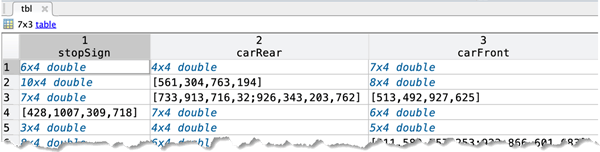
    Table with one column per object class, each containing bounding box coordinates

  • A table with two columns.

    The first column contains bounding boxes. The second column must be a cell vector that contains the label names corresponding to each bounding box. Each element in the cell vector must be an M-by-1 categorical or string vector, where M represents the number of labels.
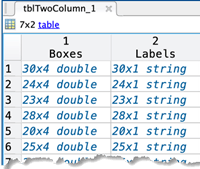
    Table with bounding boxes in first column and categorical labels in second column

To create a ground truth table, use the Image Labeler (Computer Vision Toolbox) or Video Labeler (Computer Vision Toolbox) app. To create a table of training data from the generated ground truth, use the objectDetectorTrainingData (Computer Vision Toolbox) function.

Data Types: table

Block locations, specified as a blockLocationSet (Image Processing Toolbox) object. You can create this object by using the balanceBoxLabels (Computer Vision Toolbox) function or the blockLocationsWithROI (Computer Vision Toolbox) function.

Properties

expand all

This property is read-only.

Labeled bounding box data, specified as an N-by-2 cell matrix of N images. The first column must be a cell vector that contains bounding boxes. Each element in the cell contains a vector representing either an axis-aligned rectangle, rotated rectangle, or a cuboid. The second column must be a cell vector that contains the label names corresponding to each bounding box. An M-by-1 categorical vector represents each label name.

Bounding Box Descriptions

Bounding BoxCell VectorFormat
Axis-aligned rectangleM-by-4 for M bounding boxes[x,y,width,height]
Rotated rectangleM-by-5 for M bounding boxes[xcenter,ycenter,width,height,yaw]
CuboidM-by-9 for M bounding boxes[xcenter,ycenter,zcenter,width,height,depth,rx,ry,rz]
Projected cuboidM-by-8 vector for M bounding boxes[x1,y1,w1,h1,x2,y2,w2,h2]

Maximum number of rows of label data to read in each call to the read (Computer Vision Toolbox) function, specified as a positive integer.

Object Functions

expand all

readRead data from label datastore
readallRead all data in label datastore
previewPreview subset of data in datastore
hasdataDetermine if data is available to read
resetReset datastore to initial state
subsetCreate subset of datastore or FileSet
partitionPartition a datastore
numpartitionsNumber of datastore partitions
shuffleShuffle all data in datastore
combineCombine data from multiple datastores
transformTransform datastore
isPartitionableDetermine whether datastore is partitionable
isShuffleableDetermine whether datastore is shuffleable

Version History

Introduced in R2019b

expand all