Contenido principal

imageToWorldPlane

R2026b

Rectify and align image with reference plane in world coordinate system

Since R2026b

    Description

    rectifiedImage = imageToWorldPlane(I,intrinsics,tform) rectifies the input image I onto the Z=0 world plane using the camera intrinsic parameters intrinsics and extrinsic rigid transform tform. The function removes both lens distortion and perspective distortion, and automatically determines uniform metric sampling from the camera geometry.

    rectifiedImage = imageToWorldPlane(I,intrinsics,tform,Name=Value) specifies options to control the output spatial referencing or pixel resolution using name-value arguments.

    example

    [rectifiedImage,Rout] = imageToWorldPlane(___) also returns the mappings of the pixel locations in the rectified image to world coordinates.

    Examples

    collapse all

    Create a set of calibration images. These images contain a checkerboard pattern captured from different camera views by an SLR camera.

    images = imageDatastore(fullfile(toolboxdir("vision"),"visiondata","calibration","slr"));

    Detect the checkerboard corners in all calibration images and estimate the camera intrinsic parameters. The checkerboard squares are 29 mm per side, so all world measurements are in millimeters.

    [imagePoints,patternDims] = detectCheckerboardPoints(images.Files);
    squareSize = 29;
    worldPoints = patternWorldPoints("checkerboard",patternDims,squareSize);
    I = readimage(images,1);
    imageSize = [size(I,1) size(I,2)];
    cameraParams = estimateCameraParameters(imagePoints,worldPoints,ImageSize=imageSize);
    intrinsics = cameraParams.Intrinsics;

    Load an image you want to rectify, and display it.

    imOrig = readimage(images,9);
    imshow(imOrig)
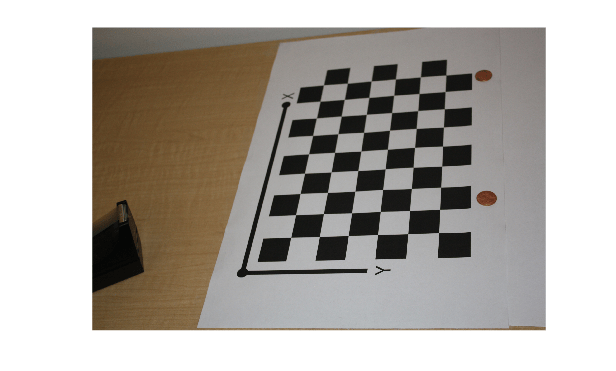
    Figure contains an axes object. The hidden axes object contains an object of type image.

    Detect the checkerboard in the image, and estimate the camera extrinsic pose relative to the checkerboard plane.

    [imagePoints,patternDims] = detectCheckerboardPoints(imOrig);
    camIntrinsics = cameraParams.Intrinsics;
    camExtrinsics = estimateExtrinsics(imagePoints,worldPoints,camIntrinsics);

    Use the imageToWorldPlane function to remove both lens distortion and perspective distortion from the image and rectify it for world plane measurement. To control the resolution of the output image and enable precise measurement, specify the PixelExtentInWorld argument. Use a value of 0.1 so each pixel in the image corresponds to 0.1 mm in the real world, providing high spatial resolution for sub-millimeter measurements.

    [rectifiedImage,Rout] = imageToWorldPlane(imOrig,intrinsics,camExtrinsics);
    imageshow(rectifiedImage)
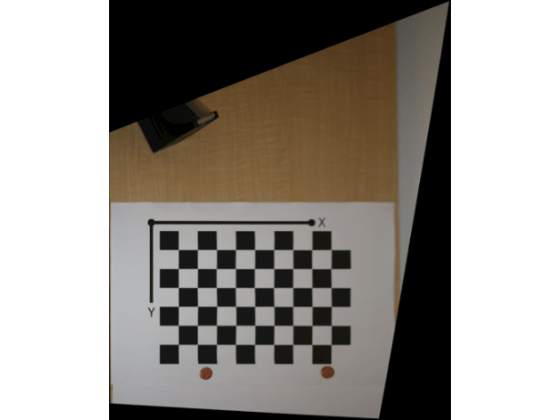
    Input Arguments

    collapse all

    Input image to rectify, specified as an M-by-N grayscale or M-by-N-by-3 truecolor image. The image must be real, finite, nonempty, and nonsparse.

    Data Types: uint8 | uint16 | int16 | single | double

    Camera intrinsic parameters of the camera that captured image I, specified as a cameraIntrinsics or cameraIntrinsicsKB object. The intrinsic parameters include focal length, principal point, image size, and distortion coefficients, defining the mapping between 3-D camera coordinates and 2-D image coordinates. Use estimateCameraParameters to obtain camera intrinsics parameters for the standard lens model, or use estimateFisheyeParameters to obtain camera intrinsic parameters for the Kannala-Brandt fisheye model.

    Camera extrinsic pose, specified as a rigidtform3d object. The transform defines the rotation and translation between the world coordinate system and the camera coordinate system. Use the estimateExtrinsics function to obtain the camera extrinsic pose from an image of a calibration pattern placed on the measurement reference plane.

    Name-Value Arguments

    collapse all

    Specify optional pairs of arguments as Name1=Value1,...,NameN=ValueN, where Name is the argument name and Value is the corresponding value. Name-value arguments must appear after other arguments, but the order of the pairs does not matter.

    Example: imageToWorldPlane(I,intrinsics,tform,PixelExtentInWorld=0.1) specifies to use a metric pixel resolution of 0.1 mm.

    Metric pixel resolution, specified as a positive scalar. The value defines the number of world units per pixel in the rectified output image. The units match the calibration units used by the estimateCameraParameters. For example, if the calibration pattern square size is in millimeters, then PixelExtentInWorld is in millimeters per pixel.

    If you specify this value as "auto", the function estimates the resolution from the camera intrinsic parameters and extrinsic pose. Set this value smaller than the size of objects you want to measure. Decrease this value to preserve detail in the image you want to measure at the cost of larger output images.

    You cannot specify the OutputView and PixelExtentInWorld arguments simultaneously.

    Spatial referencing information of the image, specified as an imref2d object.

    If you specify this value as "auto", the function automatically computes the world bounds and resolution of the rectified image from the camera intrinsic parameters and extrinsic pose. When you specify this value as an imref2d object, the function uses the provided spatial referencing to define the output image bounds and resolution. Use this argument to focus on a specific region of interest or to ensure consistent output dimensions across multiple images.

    You cannot specify the OutputView and PixelExtentInWorld arguments simultaneously.

    Output Arguments

    collapse all

    Rectified image on the world plane, returned as an M-by-N grayscale or M-by-N-by-3 truecolor image of the same size as the input image I. Each pixel in the output corresponds to a uniform metric area on the Z=0 world plane. The image shows a bird's-eye view with both lens distortion and perspective distortion removed. Regions that are outside the field of view or behind the camera and do not map to valid camera coordinates appear as black.

    Spatial referencing information of rectified image, returned as an imref2d object. Rout maps pixel indices in rectifiedImage to world coordinates on the Z=0 plane, and enables you to perform direct metric measurement from the rectified image.

    Tips

    • For production vision systems that process many images from the same fixed camera, use imageToWorldPlaneMapping to precompute the displacement field once, then apply it to each image using imwarp. This avoids recomputing the geometric mapping for every frame and is significantly faster for batch processing.

    • If you need world coordinates for only a small number of specific points (for example, detected feature locations or centroids), use imagePointsToWorldPlane instead of rectifying the entire image. This is more efficient when an image contains fewer points of interest.

    Extended Capabilities

    expand all

    C/C++ Code Generation
    Generate C and C++ code using MATLAB® Coder™.

    Version History

    Introduced in R2026b