objectInsertionDatastore
R2026bCreate synthetic labeled datastore for training an instance segmentation or object detection network
Since R2025a
Description
The objectInsertionDatastore object blends datastores of labeled
images containing foreground objects with destination images containing the background. Using
this object, you can create a synthetic labeled datastore for training an instance
segmentation or object detection network.
To insert an object into a single background image at a randomized or specified location,
use the insertObjectInImage function.
Note
This functionality requires Deep Learning Toolbox™.
Creation
Syntax
Description
dsNew = objectInsertionDatastore(dsDestination,dsObject,numNewImages)dsNew by inserting objects from the
source datastore dsObject into the destination datastore containing
image data, dsDestination. The objects from the source images are
inserted at randomized locations on the destination images. You must specify the number of
images synthetic images to create, numNewImages.
dsNew = objectInsertionDatastore(___,PropertyName=Value)NumObjectsToInsert=2
specifies the number of objects to insert as 2.
Input Arguments
Properties
Examples
Create a datastore containing synthetic anomalous images by using normal images of industrial parts from the RobustAD data set, attached to this example as a folder of supporting files.
Create Destination Datastore
Create a combined datastore for the destination background images paired with their region constraint masks. The region constraint masks define the valid areas on the plate surface at which to insert anomalies, preventing placement on the background.
destFiles = dir(fullfile("PlateData","normal","Normal_*.jpg"));
dsDest = imageDatastore(fullfile({destFiles.folder},{destFiles.name}));

maskDestFiles = dir(fullfile("PlateData","normalMasks","NormalMask_*.png"));
dsRegionMask = imageDatastore(fullfile({maskDestFiles.folder},{maskDestFiles.name}));

dsDestination = combine(dsDest,dsRegionMask);
Visualize Sample from Destination Datastore
Read a sample from the destination datastore to visualize the normal plate image and its corresponding region constraint mask. Reset the datastore after reading to return the read pointer to the beginning for subsequent operations.
sample = read(dsDestination);
figure
tiledlayout(1,2)
nexttile
imshow(sample{1})
title("Normal Plate Image")
nexttile
imshow(sample{2},[])
title("Region Constraint Mask")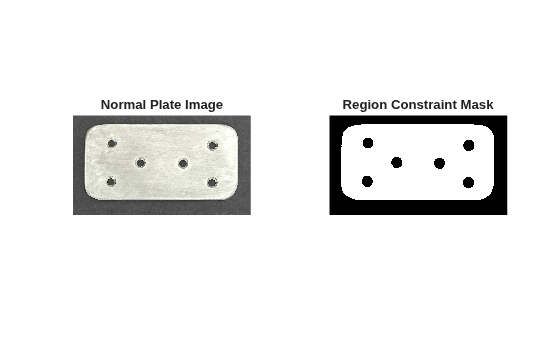
reset(dsDestination)
Create Source Object Datastore
Create a combined datastore for the source objects. The source datastore must return four elements per read: the source image, bounding boxes, categorical labels, and a 3-D logical mask array.
srcFiles = dir(fullfile("PlateData","anomalyImages","Image_*.jpg"));
dsSrcImages = imageDatastore(fullfile({srcFiles.folder},{srcFiles.name}));
Compute Bounding Boxes and Per-Object Masks
Extract individual object bounding boxes and per-object masks from each anomaly mask by using connected component analysis. Save a separate annotation MAT file for each anomaly image.
maskFiles = dir(fullfile("PlateData","anomalyMasks","anomalyMask_*.png"));
matDir = fullfile(pwd,"anomalyAnnotations");
if ~isfolder(matDir)
    mkdir(matDir);
end

numImages = numel(maskFiles);
for i = 1:numImages
    [~,name] = fileparts(maskFiles(i).name);
    matFilePath = fullfile(matDir,name + ".mat");
    [boxes,labels,masks3D] = extractObjectData(fullfile(maskFiles(i).folder,maskFiles(i).name));
    save(matFilePath,"boxes","labels","masks3D");
end
Create File Datastore for Object Annotations
Use a single fileDatastore to load annotations from the saved MAT files. Then use the transform function to convert the datastore to the four-element cell array format required by the objectInsertionDatastore object.
dsAnnotations = fileDatastore(fullfile(matDir,"*.mat"),ReadFcn=@(f) load(f));
dsCombined = combine(dsSrcImages,dsAnnotations);
dsSource = transform(dsCombined,@(data) {data{1},data{2}.boxes,data{2}.labels,data{2}.masks3D});
Visualize Sample from Source Datastore
Read a sample from the source datastore to visualize the anomaly image and its per-object mask overlay. Reset the datastore after reading so that the next read starts from the first image.
sample = read(dsSource);
srcImage = sample{1};
srcBoxes = sample{2};
srcMask = any(sample{4},3);
figure
tiledlayout(1,2)
nexttile
annotated = insertObjectAnnotation(srcImage,"rectangle",srcBoxes,"Anomaly");
imshow(annotated)
title("Anomaly Image with Bounding Boxes")
nexttile
imshow(srcMask)
title("Anomaly Mask")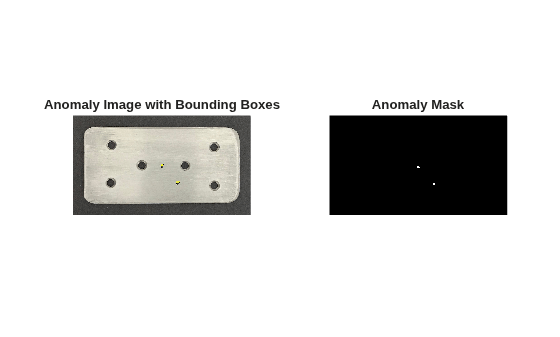
reset(dsSource)
Create Synthetic Datastore
Create a datastore of synthetic anomaly images by using the objectInsertionDatastore object to generate eight synthetic images. Specify Poisson blending for seamless defect insertion into the plate surface.
numSyntheticImages = 8;
dsNew = objectInsertionDatastore(dsDestination,dsSource,numSyntheticImages, ...
    BlendMethod="poisson");
dsNew
dsNew =
  objectInsertionDatastore with properties:

                    NumReads: 8
          NumObjectsToInsert: 1
                OutputFormat: "InstanceSegmentation"
      BoundaryConstraintMode: "inbounds-bbox"
    ObjectsInSceneMaxOverlap: 1
        MaxInsertionAttempts: 10
                 BlendMethod: "poisson"
       GeometricAugmentation: @()affinetform2d()
Visualize Synthetic Data
Read a synthetic anomaly image from the datastore, and visualize the generated image with annotated bounding boxes around the inserted anomalies.
figure
result = read(dsNew);
synImage = result{1};
boxes = result{2};
labels = result{3};
annotated = insertObjectAnnotation(synImage,"rectangle",boxes,string(labels));
imshow(annotated)
title("Synthetic Image")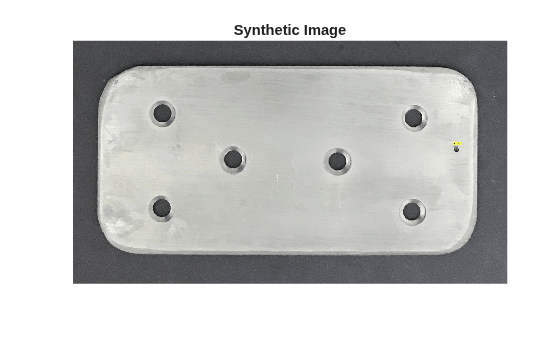
Next Steps
You can now use the synthetic datastore to train an object or anomaly detector. Reset the datastore so that a training function can iterate over all synthetic images.
reset(dsNew)
Helper Functions
extractObjectData
Extract individual defect bounding boxes, categorical labels, and per-object 3-D logical masks from a binary anomaly mask file by using connected component analysis.
function [boxes,labels,masks3D] = extractObjectData(maskFilePath)
    m = imread(maskFilePath);
    cc = bwconncomp(m);
    numObj = cc.NumObjects;
    props = regionprops(cc,"BoundingBox");
    boxes = vertcat(props.BoundingBox);
    labels = repmat(categorical("Anomaly"),numObj,1);
    L = labelmatrix(cc);
    masks3D = false(size(m,1),size(m,2),numObj);
    for j = 1:numObj
        masks3D(:,:,j) = (L == j);
    end
end
References
[1] He, Kaiming, Jian Sun, and Xiaoou Tang. “Guided Image Filtering.” IEEE Transactions on Pattern Analysis and Machine Intelligence 35, no. 6 (June 2013): 1397–1409. doi:10.1109/TPAMI.2012.213.
[2] Pérez, Patrick, Michel Gangnet, and Andrew Blake. “Poisson Image Editing.” In ACM SIGGRAPH 2003 Papers, 313–18. San Diego California: ACM, 2003. doi:10.1145/1201775.882269.
Version History
Introduced in R2025aSee Also
insertObjectInImage | ImageDatastore | imblend | affinetform2d | insertObjectMask | imguidedfilter

