fitangle
R2026bDescription
measurementData = fitangle(I,position)I, by
positioning an angle tool at the position position. This function
performs a semi-automatic angle measurement when the tool snaps to linear edges detected
near the specified position.
measurementData = fitangle(I,position,Name=Value)SnapNeighborhood=10 specifies the snapping neighborhood as 10
pixels.
Examples
Read a test image of a metal plate into the workspace.
A = imread("solidplate.png");
A = imadjust(A);
hIm = imageshow(A);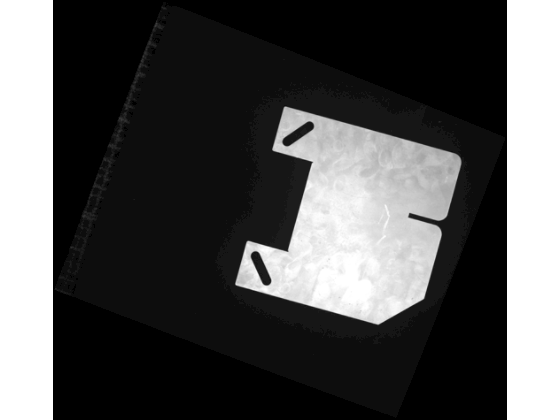
Measure the angle at a specified vertex using the fitangle function.
angleToolVertices = [2215 2166; 2484 1996; 2563 1743];
hAngle = fitangle(A,angleToolVertices)
hAngle = struct with fields:
    Position: [3×2 double]
       Theta: 135.0553
Input Arguments
Input image in which to perform the angle measurement, specified as one of these values:
| Image Type | Data Format |
|---|---|
| Grayscale | H-by-W numeric matrix |
| RGB | H-by-W-by-3 numeric array |
Note
By default, spatial image coordinates are in the intrinsic coordinate
system, where the center of the upper left pixel has intrinsic coordinates
(1.0, 1.0). If you perform a coordinate transformation on the image input
I, units are defined in the world coordinate system. To
learn more, see Image Coordinate Systems.
Angle tool position, in pixels, specified as a 3-by-2 numeric matrix. The rows of the numeric matrix are in the form [x, y] and represent the start point, vertex point, and end point coordinates that define the angle.
Name-Value Arguments
Specify optional pairs of arguments as
Name1=Value1,...,NameN=ValueN, where Name is
the argument name and Value is the corresponding value.
Name-value arguments must appear after other arguments, but the order of the
pairs does not matter.
Example:
fitangle(hImage,position,SnapNeighborhood=10) specifies the snapping
neighborhood as 10 pixels.
Snap the angle to linear edges, specified as a numeric or logical
1 (true) or 0
(false). By default, the tool snaps the two lines between
the start point, vertex point, and end point.
Specify the snap method using the LineSnapMethod
argument. Specify the snap neighborhood using the
SnapNeighborhood argument.
Snapping neighborhood, specified as a positive integer. The
SnapNeighborhood is the perpendicular distance on
either side of each angle line segment within which the angle tool searches for
linear edges to snap to. Units are in pixels.
To enable automatic snapping of the angle to linear edges, specify the
Snap argument as true (or
1).
Method for automatically aligning reference lines to edges, specified as one of these options:
"closest"— Snap the reference line to the closest linear edge based on pixel distance from the midpoint of the reference line to the linear edge. Use this method for simple images with well-defined edges."strongest"— Snap the reference line to the linear edge with the highest Hough accumulator value. Use this method when multiple edges are close together but one is more prominent, or in noisy images where only strong features are of interest."parallel"— Snap the reference line to the linear edge that has the highest cosine similarity to the reference line. Use this method to snap to the edge that is most parallel to a specified reference line, regardless of its position."combined"— Snap the reference line to a linear edge based on the combined metrics of the"closest","strongest", and"parallel"methods.
Edge detection method for snapping, specified as a logical array or one of these options.
| Method | Description |
|---|---|
"canny"
| Finds edges by looking for local maxima of the
gradient of the image. The |
"sobel"
| Finds edges at those points where the gradient of the image is maximum, using the Sobel approximation to the derivative. |
"prewitt"
| Finds edges at those points where the gradient of the image is maximum, using the Prewitt approximation to the derivative. |
"roberts"
| Finds edges at those points where the gradient of the image is maximum, using the Roberts approximation to the derivative. |
"log"
| Finds edges by looking for zero-crossings after filtering the image with a Laplacian of Gaussian (LoG) filter. |
"zerocross"
| Finds edges by looking for zero-crossings after filtering the image. |
"approxcanny"
| Finds edges using an approximate version of the Canny edge detection algorithm that provides faster execution time at the expense of less precise detection. |
If you specify EdgeMap as a logical array,
you define a binary image that contains precomputed edge locations for
snapping. Select this option to avoid repeated edge detection when making
multiple measurements on the same image.
Geometric transformation for the input image data that defines a 2-D world
coordinate system, specified as an affinetform2d object, an imref2d object, a rigidtform2d object, a simtform2d object, or a transltform2d object.
If you perform a coordinate transformation on the input image data, the
units of measurementData are defined in the world
coordinate system. To learn more about image coordinate systems, see Image Coordinate Systems.
Output Arguments
Angle measurement result, returned as a structure with these fields:
measurementData Field | Description |
|---|---|
Theta | Measured angle, stored as a positive numeric scalar. |
Position | Position of the angle tool, stored as a 3-by-2 numeric matrix. The rows of the numeric matrix are in the form [x, y] and represent the start point, vertex point, and end point coordinates that define the angle. Note
|
Extended Capabilities
Usage notes and limitations:
String inputs must be compile-time constants.
Usage notes and limitations:
String inputs must be compile-time constants.
Version History
Introduced in R2026b
See Also
uifitangle | affinetform2d | imref2d | rigidtform2d | simtform2d | transltform2d
MATLAB Command
You clicked a link that corresponds to this MATLAB command:
Run the command by entering it in the MATLAB Command Window. Web browsers do not support MATLAB commands.


Seleccione un país/idioma
Seleccione un país/idioma para obtener contenido traducido, si está disponible, y ver eventos y ofertas de productos y servicios locales. Según su ubicación geográfica, recomendamos que seleccione: .
También puede seleccionar uno de estos países/idiomas:
Cómo obtener el mejor rendimiento
Seleccione China (en idioma chino o inglés) para obtener el mejor rendimiento. Los sitios web de otros países no están optimizados para ser accedidos desde su ubicación geográfica.
América
- América Latina (Español)
- Canada (English)
- United States (English)
Europa
- Belgium (English)
- Denmark (English)
- Deutschland (Deutsch)
- España (Español)
- Finland (English)
- France (Français)
- Ireland (English)
- Italia (Italiano)
- Luxembourg (English)
- Netherlands (English)
- Norway (English)
- Österreich (Deutsch)
- Portugal (English)
- Sweden (English)
- Switzerland
- United Kingdom (English)